DroneLog | Free Open Source Flight Log Viewer - Open DroneLog
Lire sur opendronelog.com ↗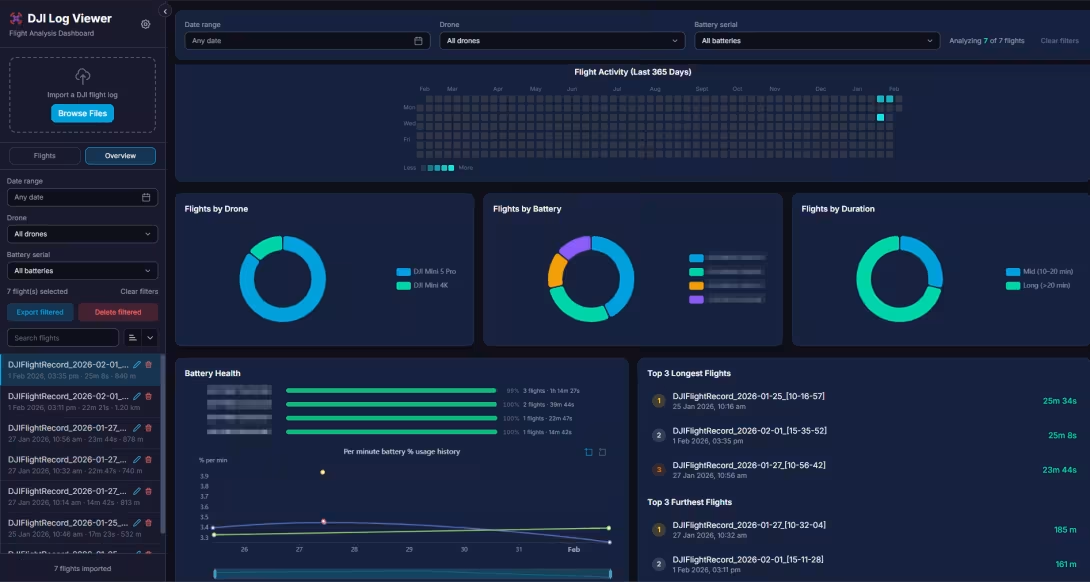
Free, open-source drone flight log analyzer for DJI and Litchi. Analyze telemetry, replay 3D flights, track battery health with privacy-first local storage. Desktop & Docker available.
Open Drone Log: The Free Drone Log Dashboard
Free, open-source drone flight log analyzer for DJI and Litchi. Analyze telemetry, replay 3D flights, track battery health with privacy-first local storage. Desktop & Docker available.


Powerful Features, Zero Cost
Everything you need to analyze, visualize, and manage your drone flight data, without paying a dime.
Open Source
AGPLv3 licensed. Inspect, modify, and contribute to the codebase.
Privacy First
All data stored locally. No cloud uploads. Your flights stay yours.
Free Forever
No subscriptions, no premium tiers, no paywalls. Completely free.
Cross-Platform
Windows, macOS, Linux, Raspberry pi, and Docker. Run anywhere.
Flight Log Report
Generate comprehensive, professional flight log PDF reports for compliance and client deliverables.
Smart Tagging
Auto-tag flights: Night Flight, High Speed, Cold Battery, and more.
3D Map Replay
Interactive 3D flight path visualization with altitude-aware aircraft marker.
Bulk Export
Export to CSV, JSON, GPX, and KML formats. Batch export multiple flights.
Backup & Restore
Full database backup and restore. Move your data between devices easily.
Supports DJI & Litchi Formats
Import your DJI flight logs (.txt) and Litchi CSV exports with automatic unit detection. Smart deduplication prevents duplicate imports, even from different export versions.
Beautiful Interface, Powerful Analysis
Experience detailed telemetry charts, 3D flight maps, and comprehensive statistics - all in one place.


Click any screenshot to enlarge
Export Flight Log Reports
Generate comprehensive, professional flight log reports instantly. Perfect for commercial drone pilots, regulatory compliance, and client deliverables.
User Selectable Fields
The fields for the report are completely user selectable so you only include what you need.
Ready for Print & PDF
Optimized layout that looks great on screen, printed on paper, or exported as PDF.
Instant Reporting
No fees, No limit, just filter your flight,
choose export filtered as HTML report, and print
as PDF with
Ctrl+P.

See the Difference
Compare Open DroneLog with popular commercial alternatives. See why privacy-conscious pilots are making the switch.
| Feature |  Open DroneLog Recommended Open DroneLog Recommended | Cloud-based Logbook |  Flight Reader Flight Reader |
|---|---|---|---|
| Price | Free Forever | $6.99/mo ($84/yr) | One time ($79 USD) |
| Open Source | ✓ | ✗ | ✗ |
| Data Privacy | 100% Local | Cloud Upload Required | 100% Local |
| Desktop App | ✓ | ✗ | ✓ |
| Self-Hosted Web | ✓ | ✗ | ✗ |
| Flight Replay | 3D view | 2D view | 3D view (limited) |
| Compatibility | Windows, Mac, Linux, Docker | Browser-based | Windows native |
| Telemetry Charts | ✓ | ✓ | ✓ |
| Smart Auto-Tagging | ✓ | ✗ | ✗ |
| Geocoding | ✓ | ✓ | ✗ |
| DJI Log Support | ✓ | ✓ | ✓ |
| Litchi CSV Support | ✓ | ✓ | ✗ |
| Export Formats | CSV, JSON, GPX, KML | CSV, KML | CSV |
| Backup & Restore | Full database backup | No Bulk export | Bulk Export only |
| Battery Health Tracking | ✓ | ✓ | ✗ |
| Unlimited Flights | ✓ | Paid Plan over 100 logs | Limited |
| Import support | Local folder sync/direct upload | DJI cloud/direct upload | DJI cloud/direct upload |
Price
Open Source
Data Privacy
Desktop App
Self-Hosted Web
Flight Replay
Compatibility
Telemetry Charts
Where to Find Your Log Files
Locate your DJI flight logs from any device in just a few simple steps.
Android
DJI Fly or DJI Go app on Android devices
Connect your phone
Connect your Android device to your computer via USB cable and enable file transfer mode (MTP)
Navigate to log folder
Browse to Internal Storage/Android/data/dji.go.v5/files/FlightRecord/ (or dji.go.v4 for older DJI Go app)
Copy the .txt files
Copy all the DJIFlightRecord_*.txt files to your computer and import them into Open DroneLog
iPhone / iPad
DJI Fly or DJI Go app on iOS devices
Open DJI Fly app
Launch the DJI Fly app on your iPhone/iPad and go to Profile → More → Flight Records
Export your flights
Tap the Share icon, select the flights you want to export, and choose Export Flight Data
Transfer to computer
Save the exported .txt files using AirDrop, Files app, or email — then import into Open DroneLog
DJI RC / Smart Controller
DJI RC, RC 2, RC Pro, or Smart Controller with built-in screen
Connect RC via USB
Connect your DJI remote controller to your computer using a USB-C cable and allow USB file transfer
Locate the flight logs
Navigate to Internal Storage/Android/data/dji.go.v5/files/FlightRecord/ on the controller
Copy and import
Copy the DJIFlightRecord_*.txt files to your computer and drag them into Open DroneLog
Airdata UAV
Export your logs from Airdata.com
Access your account
Go to your Airdata flight logs and click on My Account
Navigate sidebar
In the left sidebar, under My Data section, select Download My Data
Request data export
Click Request Export and wait for their email with a zip file containing the .txt log files you uploaded to Airdata. Download the zip, extract the files, and import them into Open DroneLog
Pro Tip: Keep Your Logs Organized
Create a dedicated folder on your computer for flight logs and sync it regularly. Open DroneLog automatically detects duplicates, so you can safely import the same folder multiple times without worrying about duplicate entries.
What Pilots Are Saying
Join thousands of drone pilots who've made the switch to Open DroneLog.
"Amazing work! Just downloaded and loaded up all my flight logs!! Bought you a cup of coffee!!"
"This works very good... also seems to pull in the radio signal which is a nice extra for crash reports. Well done!"
"This is awesome! Got it running on my TrueNAS server. Look forward to future development!"
Join the Community
Everything You Need to Know
Common questions about Open DroneLog, DJI log analysis, and privacy.
Is Open DroneLog really free?
Yes, Open DroneLog is completely free and open source under the AGPLv3 license. There are no subscriptions, premium tiers, or paywalls. All features are available to everyone at no cost, forever.
Which drones and flight logs are supported?
Open DroneLog supports all DJI drones that generate .txt flight logs including DJI Mini, Mavic, Air, and Phantom series. It also supports Litchi CSV exports with automatic metric/imperial unit detection.
Is my flight data private and secure?
Absolutely. All your flight data is stored locally on your device in a DuckDB database. Your logs never leave your computer, ensuring complete privacy and data ownership. Unlike cloud-based alternatives, you're not uploading sensitive flight information to third-party servers.
Why this is sending HTTP requests to DJI servers?
The newer versions of the log files are encryptred and require fetching the decryption keys from DJI servers to decode the flight data. This is done locally on your device and the decrypted data never leaves your computer. This allows Open DroneLog to support the latest DJI drones while still ensuring your privacy.
Can I export my flight data?
Yes! Open DroneLog supports exporting to multiple formats including CSV, JSON, GPX (for GPS tracking apps), and KML (for Google Earth). You can also backup your entire database and restore it on any platform.
What platforms are supported?
Open DroneLog runs on Windows, macOS, and Linux as a desktop application. You can also deploy it as a self-hosted web app using Docker on any server or NAS device.
Still have questions?
Ask on GitHub DiscussionsWhy Sponsor Open DroneLog?
- If you're a drone-related company that uses or appreciates this software, sponsoring is a great way to give back.
- Get featured prominently on this official website, reaching our growing community of drone enthusiasts.
- Support the open-source mission and help keep this tool free for everyone.
We don't place ads inside the application. We believe ads disrupt the user experience and cause inconvenience. Instead, we offer sponsors visibility here on our official website - a respectful alternative that supports the project without compromising usability.

Ready to Analyze Your Flight Logs?
Download Open DroneLog today and experience the freedom of truly private, powerful flight log analysis. No subscriptions, no cloud uploads, no compromises.
Or deploy with Docker:
docker pull ghcr.io/arpanghosh8453/open-dronelog:latest
Built by a Drone Enthusiast

As a drone pilot and software developer, I was frustrated with the lack of privacy-focused, free tools for analyzing flight logs. Commercial solutions required expensive subscriptions and cloud uploads. So I built Open DroneLog, the tool I always wanted.
This project is a labor of love, maintained in my free time. Your support through donations helps fund development time, server costs for builds, and motivates continued improvements.
Email revealed on click to prevent spam bots
Support This Project
Your donations fund features, fixes, and keep this project alive.
Other Projects by Arpan
Check out these other popular open source projects for health data visualization.
Garmin Grafana
A Dockerized python script to fetch Garmin health data and populate that in a InfluxDB Database, for visualization long term health trends with Grafana.
Fitbit Grafana
A script to fetch data from Fitbit servers using their API and store the data in a local InfluxDB database and visualize them with Grafana.
Fitbit Web UI
A Web dashboard where you can view your Fitbit yearly trends as a wellness report and download it as PDF.
Texte archivé automatiquement depuis la page d’origine lors de l’ajout du lien.