
Aller au contenu principal
Kgaut's links

Navigation principale

  • Accueil
Menu du compte de l'utilisateur
  • Se connecter

Fil d'Ariane

  1. Accueil

5 Docker containers I use to manage my home like a pro

Par kgaut , 4 septembre 2025
URL
5 Docker containers I use to manage my home like a pro
body

5 Docker containers I use to manage my home like a pro

4
By  Parth Shah
Published 7 days ago
 
Follow
 

Followed 

Thread 5 
Link copied to clipboard

Related

Front view of a desk with the LG UltraWide 49W95C monitor, a laptop, and various peripherals.
This tiling window manager was the missing piece of my ultrawide screen setup 


alienware 16 area 51 review13
I never believed in desktop replacement laptops, until I came face-to-face with the Maingear Ultima 18 


Why I ditched Google Docs for a Markdown-based writing setup - featured
This free, open-source app saved me from juggling ten different writing tools 


Sign in to your XDA account
 
Top Docker containers for productivity
 

With endless tasks, recipes, personal projects, and notes, managing your home can be a tough task. You can always use traditional apps to get the job done. But what if you could take back control and run everything yourself? This is where Docker comes in. By using a handful of powerful and lightweight Docker containers, you can transform a single machine into the brain of your home.

Let me show you essential Docker containers that have helped me create a smart home that truly works for me.

Firefly III

Manage your home expenses like a pro
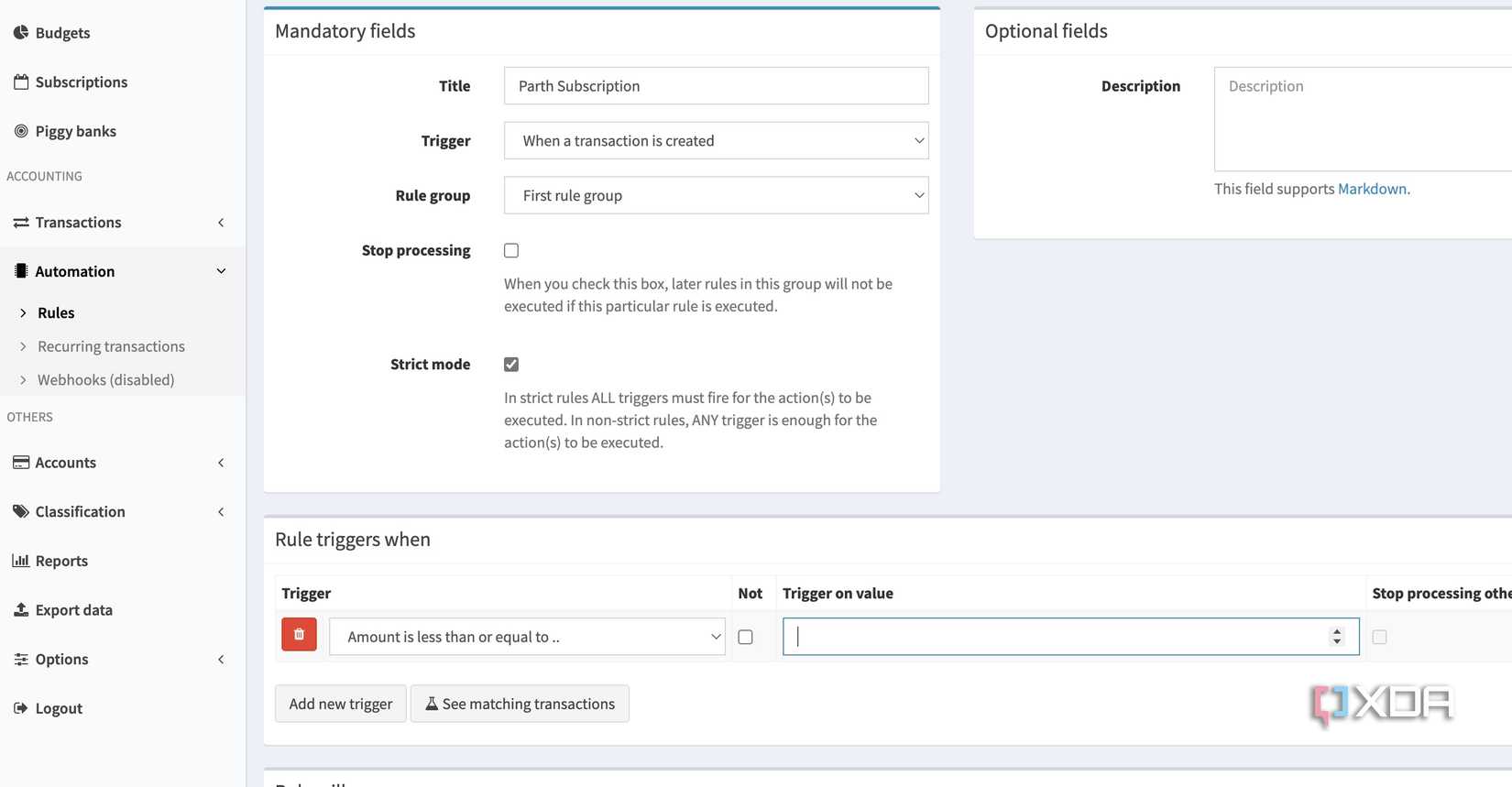
Firefly docker container

Firefly is an absolute must-have for anyone. Before that, I used to rely on an Excel spreadsheet to track my expenses and budgets, and it was a tedious, manual process. But Firefly III has transformed my home expenses management in no time.

First of all, it gives a neat dashboard where I can glance over everything. I can check my monthly subscription amount, the money left to spend, my net worth, and several graph views to understand where my money is going.

There is also a piggy bank function that I use to track money for my dream purchases, like the HP Elitebook and the Samsung M9 OLED monitor.

However, my favorite part is Rules, where I can create automations for frequent transactions. The possibilities are endless with it. Other features include multiple accounts, detailed reports, the ability to export expenses in different formats, budgets, and more.


Super Productivity

An ideal task and time management tool

Of all the tools in my home management, Super Productivity had the most direct impact on my daily work. I have always struggled to find a single, unified system for managing tasks and time.

Super Productivity offers all the neat add-ons in a single self-hosted package. I use it for everything. I create daily task lists and break down large projects into smaller, manageable to-dos.

I can access today’s tasks, schedule, planner, boards, and even tags right from the sidebar. When it comes to tasks, I can add descriptions, frequency, and even insert attachments.

The built-in Pomodoro timer is a lifesaver. It helps me stay focused on a single task for a set period. This has been quite handy for understanding where my time is actually going and helping me plan my home tasks more effectively.

The list of features continues with a calendar view that supports time blocking, the Eisenhower Matrix, powerful time tracking, and more.


Kitchenowl

A handy recipe and meal planner

KitchenOwl ingredients

This Docker container changed how my family manages food, grocery shopping, and plans meals. At its core, KitchenOwl is a self-hosted grocery list and recipe manager. The fact that it’s a Docker container means I had it up and running in minutes.

I like how it brings all of our food-related information into one place. My partner and I both have the app on our phones, and the shopping list syncs in real-time.

The biggest USP of Kitchenowl is recipe management and meal planning. I can import recipes (or manually add) from selected websites with a single click. It automatically scrapes ingredients, instructions, and even images.

When I’m planning out our meals for the week, I simply add the recipes to our meal plan, and Kitchenowl fills in the grocery list with all the ingredients we need.


Outline

A self-hosted Notion clone

Outline home

As someone who constantly strives to optimize and document every aspect of my home and digital life, Outline has become a vital part of my self-hosted toolkit.

I think of it as my personal, private, and customizable version of Notion. While I love the collaborative and intuitive interface of Notion, I wanted a solution where all my data was stored on my own hardware. Outline, with its Docker container, delivered exactly that.

It offers a blazing-fast editor with Markdown support. It’s fast, and I can quickly jot down notes and create detailed documents. Outline also supports backlinks. I have a main Home Lab document, and from there, I link to individual pages for each service, like KitchenOwl and Firefly III.

This creates a structured and interconnected web of information. Outline has a long list of features like templates, pin, comments, history, insights, integration with third-party apps like Slack and GitHub, and more.


Home Assistant

Supercharge your smart home
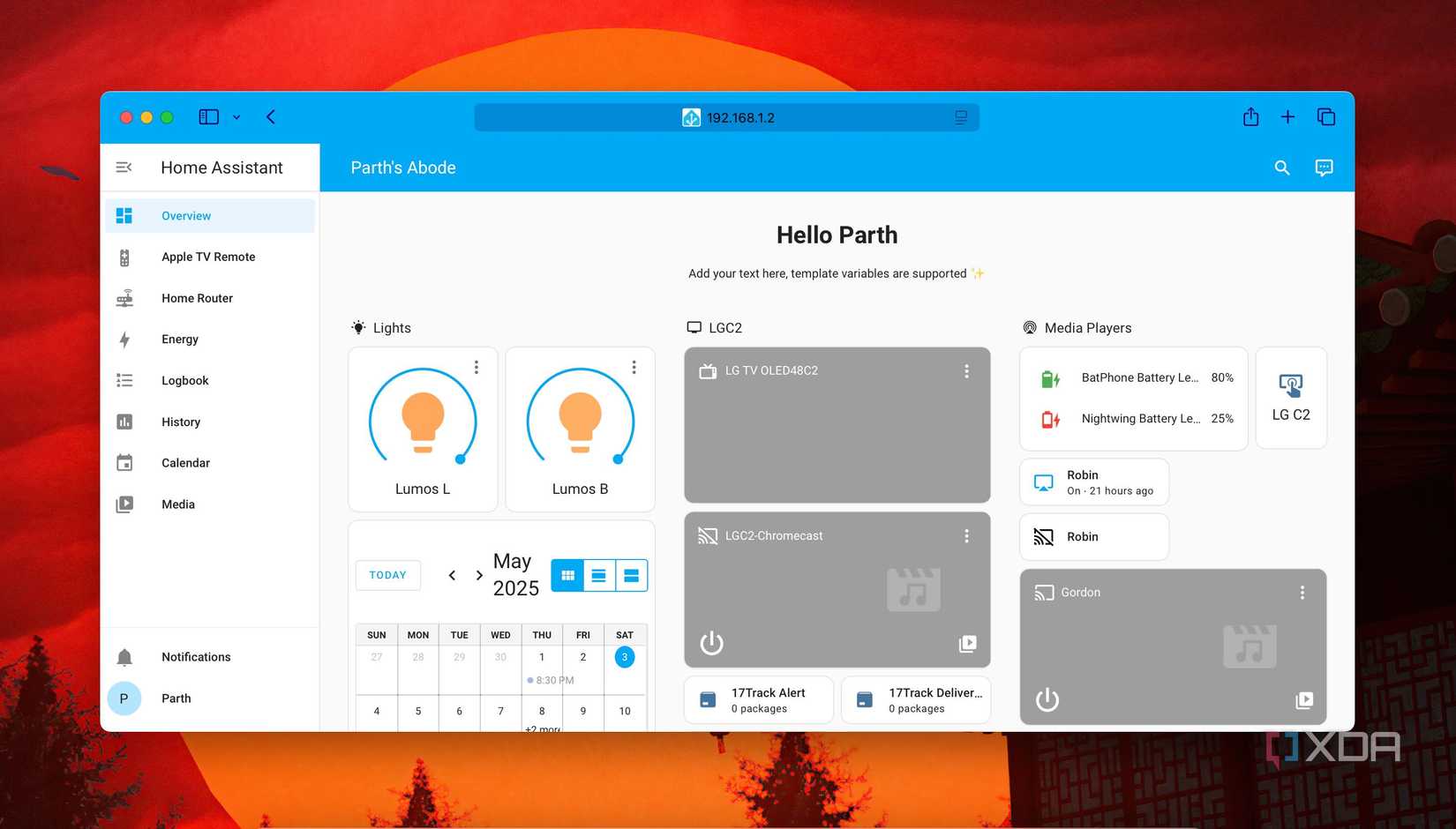
Home assistant home menu

Speaking of the top Docker containers to manage at home, how can I leave Home Assistant behind? It brings all my smart devices together on a single platform, regardless of their OEM.

It doesn’t matter if I’m using a Zigbee-based light switch, a Wi-Fi-connected thermostat, or a camera with a custom API; Home Assistant can certainly talk to it.

The automations I have built with Home Assistant have changed my daily routine. Besides, its dashboard is fully customizable, so I have created a central control panel that displays everything I care about at a glance. You can even use several add-ons with Home Assistant to spice up the experience. It’s the best example of what free and open-source software should be.

Docker the house

Adopting these Docker containers has been a huge productivity booster for me. It’s not just about centralizing services or saving a few dollars on subscriptions; it’s about taking ownership of my data and building a home system that is suited to my needs.

Of course, these are just my personal picks. The Docker community is vast and ever-growing. You shouldn’t limit yourself to these options only. For instance, you can use Vaultwarden to manage your passwords and even try Plex rivals like Jellyfin to build a personal media library.

 
docker-mark-blue

Source: Docker

Docker


See at Docker


  • Productivity & Creativity Tools
 
Follow
 

Followed 


Share

Facebook X LinkedIn Reddit Flipboard Copy link Email 


Thread 5
Sign in to your XDA account
 

We want to hear from you! Share your opinions in the thread below and remember to keep it respectful.


Reply / Post
 

Attachment(s)

Please respect our community guidelines. No links, inappropriate language, or spam.
 

Your comment has not been saved

Send confirmation email


  • protoman2029 User Display Picture 

    protoman2029

    User Display Picture
    protoman2029
    #CB923570
    Member since 2025-08-19
    0
    Threads
    4
    Posts
    Following
    0
    Stories
    0
    Topics
    0
    Authors
    0
    Users
     
    Follow
     

    Followed 

    0 Followers 

    View

    I feel like Watchtower would be a great addition to this list. I'm pretty hands-off, so I don't mind automatic updates.

    2025-08-29 12:25:04
     

  • Tom User Display Picture 

    Tom

    User Display Picture
    Tom
    #AZ852928
    Member since 2025-08-29
    0
    Threads
    1
    Posts
    Following
    0
    Stories
    0
    Topics
    0
    Authors
    0
    Users
     
    Follow
     

    Followed 

    0 Followers 

    View

    In stead of Outline, I would recommend Obsidian.

    2025-08-29 10:51:56
     

  • Kenneth User Display Picture 

    Kenneth

    User Display Picture
    Kenneth
    #BL943498
    Member since 2025-09-03
    0
    Threads
    1
    Posts
    Following
    0
    Stories
    0
    Topics
    0
    Authors
    0
    Users
     
    Follow
     

    Followed 

    0 Followers 

    View

    I am wondering what platform do you host the docker containers on? I was thinking of getting a Mac mini and just wondering what others are doing?

    2025-09-03 10:32:10
     

  • Brian User Display Picture 

    Brian

    User Display Picture
    Brian
    #VZ889589
    Member since 2025-08-31
    0
    Threads
    1
    Posts
    Following
    0
    Stories
    0
    Topics
    0
    Authors
    0
    Users
     
    Follow
     

    Followed 

    0 Followers 

    View

    Good read

    2025-08-30 07:28:22
     

  • Rajkumar User Display Picture 

    Rajkumar

    User Display Picture
    Rajkumar
    #PJ654389
    Member since 2025-08-25
    0
    Threads
    1
    Posts
    Following
    1
    Stories
    0
    Topics
    0
    Authors
    0
    Users
     
    Follow
     

    Followed 

    0 Followers 

    View

    Wonderful dear. With this open source and free of cost..... This is what I am searching for these many years...... Which might save my lot of Time , Energy & Money. Thanks you so much. God bless you 🙏

    2025-08-29 19:05:30
     

  • Terms
  • Privacy
  • Feedback
 
Recommended
Notebook LM sign up page on iPad
3 Chrome extensions that help NotebookLM play nice with other tools 
Productivity & Creativity Tools

Pair NotebookLM the smart way with these extensions.

10 
 
6 days ago
The Bequiet rich CPU cooler.
Undervolting isn’t just for thermals; here are 3 extra benefits 
AMD

It's more about efficiency than thermals

12 
 
6 days ago
Creality Hi Combo 3D printer
I 3D printed a cupholder phone mount to travel between cars, and it’s a game changer 
DIY

This simple 3D-printed accessory has completely transformed the way I travel by car.


6 days ago
ASRock Radeon RX 9070 Steel Legend
This $20 device fixed all my RGB lighting woes on Linux 
Linux

No Windows-only RGB lighting apps on Linux? No problem.


Aug 28, 2025
pironman 5 nas
You can soon turn your Raspberry Pi into a NAS with ease using the Pironman 5 NAS case 
Single-Board Computers

It can store two 3.5'' drives.


Aug 28, 2025
A Windows 11 laptop running Seelen UI to provide a completely custom desktop experience
Seelen UI is the closest we have to a custom desktop environment on Windows, and it's incredible 
Windows

When fans do what Microsoft won't

6 
 
6 days ago
 
  • Today's best deals

Gigabyte B650 Aorus Elite AX
Take 40% off this feature-packed motherboard, now the perfect affordable upgrade 
 
 
19 hours ago
Alienware Aurora Gaming Desktop
Ready to game but don't want to to build? This Alienware PC with an RTX 5080 is a great choice now that it's $600 off 
 
 
21 hours ago
Intel Core Ultra 7 265K
This is the perfect CPU if you're looking to build a powerful new PC from scratch 
 
 
2 days ago

See More

The Steam logo with the home page in the background
This excellent RPG with 96% positive reviews is down to its lowest price ever on Steam 


Battlefield 6's squad poster.
Battlefield 'veterans' can't stop complaining about the BF6 beta, but some concerns are valid 


3D printed laptop accessories sitting on top of a laptop
5 ways 3D printing can prolong the life of your gadgets 


Résumé

Your home, but smarter

Image

Tags

  • docker

Mots clés

activitypubAndroidAnniversaireAppauvergnebaladebatchcacheCICultureDaronnadeddevdebiandockerDrupalfedorafirefoxgitgithubgitlabgitlab-cigooglehome-assistantjardinagekoboLecturelinuxmigrate APIOrchestrationoutilphpphpunitplexrandonnéesportSpotifysymfonysécuritéTestswallpaper
Propulsé par Drupal